Run your sales floor like you own it.
PYLO is the sales operations workstation for high-ticket teams. Calls, EODs, payment plans, webinars and commission in one place, on top of the CRM and calendar you already use.
No card needed. Most teams are live the next morning.
Connects to the stack you already run


All in one
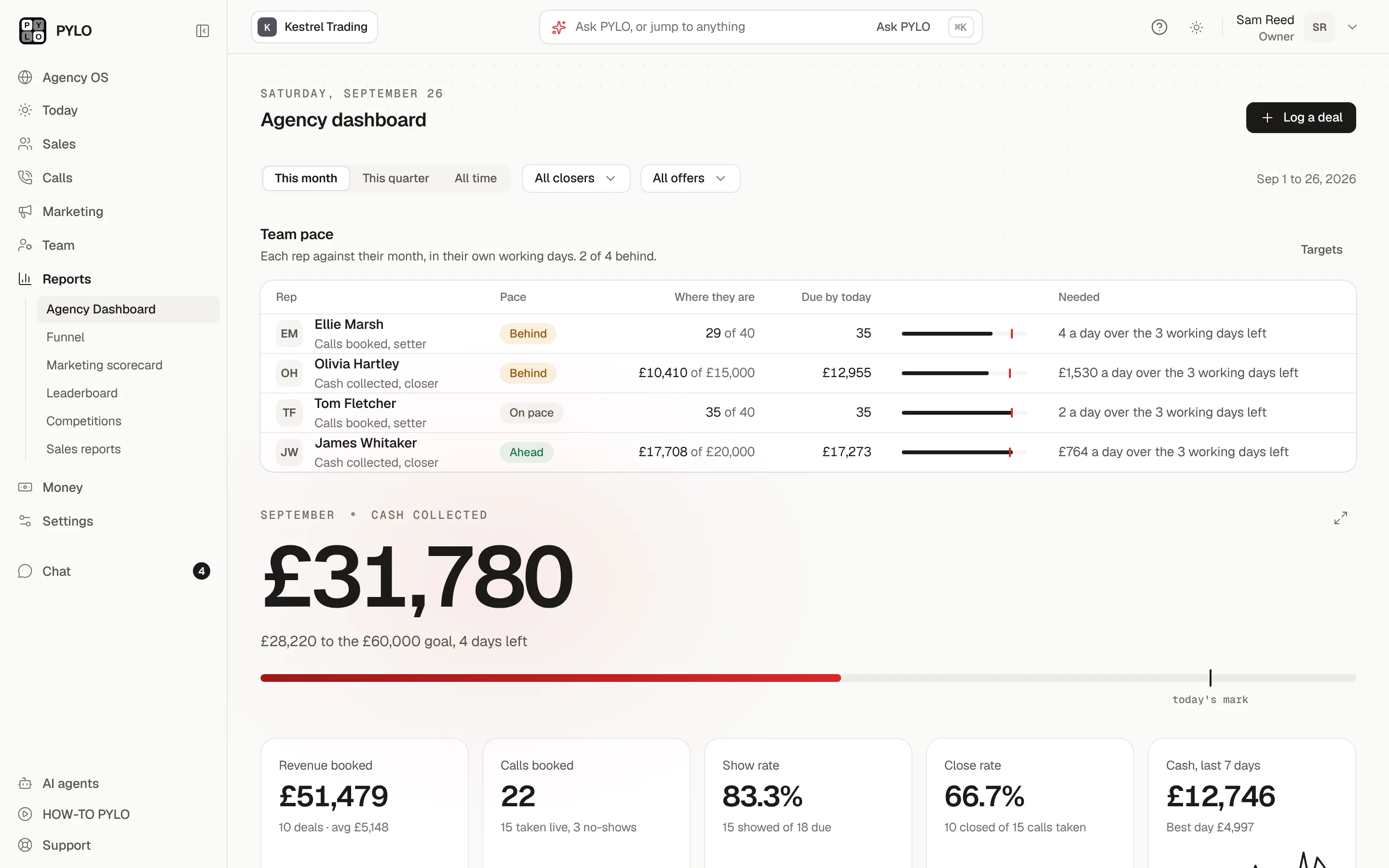
Stop paying for the tools around your CRM. PYLO runs them itself, on one bill.
Booking pages, forms, funnel pages, a dialer, a note taker and a chat for the team usually mean six logins and six invoices. PYLO has its own version of each, wired to the same leads and figures.
Capture the lead
- Landing pagesBuild a page with AI and host it on your own domain, with A/B splits, the Meta pixel and the Conversions API. Each conversion is credited to the form or booking it led to.Replaces GHL funnels and Lovable
- FormsBranching questions, partial answers and drop-off by question. Import a Typeform, then share it by link or QR code.Replaces Typeform and Tally
- Booking pagesRound robin across your closers, buffers and Google Calendar, so nobody is double booked. Your Calendly history comes with you.Replaces Calendly and iClosed
Work the lead
- Views and tasksSaved views for each setter's queue, notes on the lead, tasks with reminders and bulk actions.
- Lead routingNew leads handed out round robin or by weight the moment they arrive.
- DialerPower dial a saved view from the browser, drop a voicemail and skip anyone on the do-not-call list. Calls are recorded with the disclosure your rules need.Replaces a separate dialer
- Team chatOne-to-one and group chats inside PYLO, where you can mention a teammate or a lead.Replaces Slack for the team
Follow up
- BroadcastsOne message to an audience, with an A/B subject line and a send window.
- TemplatesOne library of texts, emails and WhatsApp messages that every workflow and broadcast picks from.
- WhatsAppConnect it and WhatsApp joins texts and email in the same inbox and workflows.
Learn from the call
- Recorder and notesDialer calls and booked Zoom or Meet calls are recorded and transcribed, with the rep and the lead labelled. Each one gets a summary, the objections raised and the next steps.Replaces a note taker
- AI call reviewEvery recording feeds the call review, and on Pro the objections are counted across every call.
PYLO in Claude
Onboard a client without leaving Claude. Your agent sets up the stack, PYLO proves it works.
Tell Claude which funnel the client runs. It builds the workspace, connects their tools with one link and runs a test lead through every step.
- Connect onceOne command, or sign in with PYLO.
- Name the funnelVSL, webinar, DM setter, community, outbound or challenge.
- Approve the planApproved with a code on your phone, and undoable.
- Watch the test lead passPYLO checks every step itself.
Claude reads your workspace on both plans. Changes and client onboarding run on Pro. ChatGPT and any other MCP client connect the same way.
PYLO AI
Ask your workspace a question. Get the answer with its reasons.
Ask who is behind, what is overdue or where the cash came from. It answers from your live workspace, with the figure and the reason. Or ask from your own agent: PYLO connects to Claude, ChatGPT and any MCP client.
A product illustration. The assistant answers from your own workspace and can only see that workspace.
Agency OS, on Pro
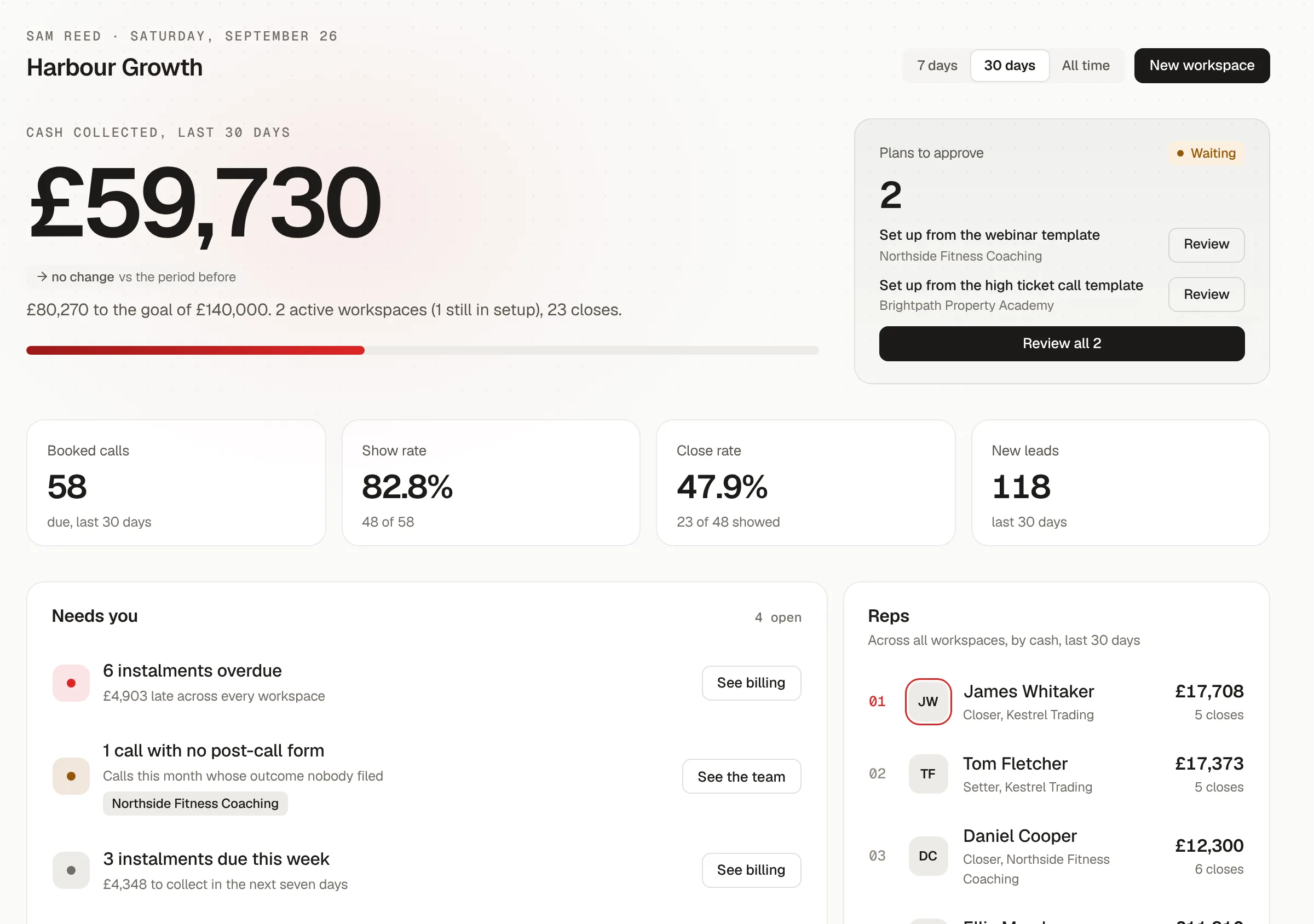
Run every client's sales team from one place.
Every client's cash, closes and missing forms on one screen against your goal. Each client's data stays separate, and your team's seats are free inside all of them.
For the reps
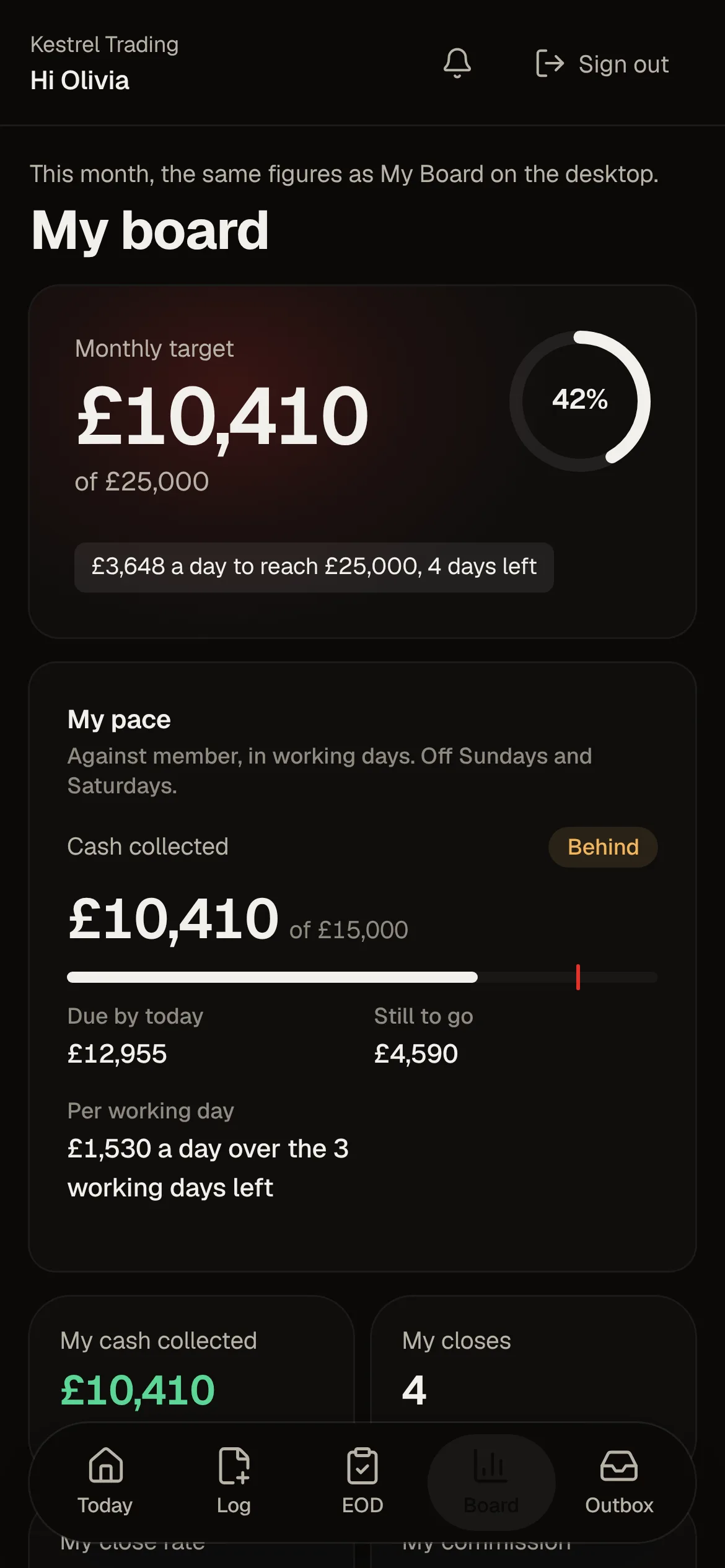
Their numbers in their pocket. Their EOD in two minutes.
Today's calls, the post-call form, the EOD and their own board, on their phone. What they log between calls is what you see on the dashboard.
Email and SMS, built in
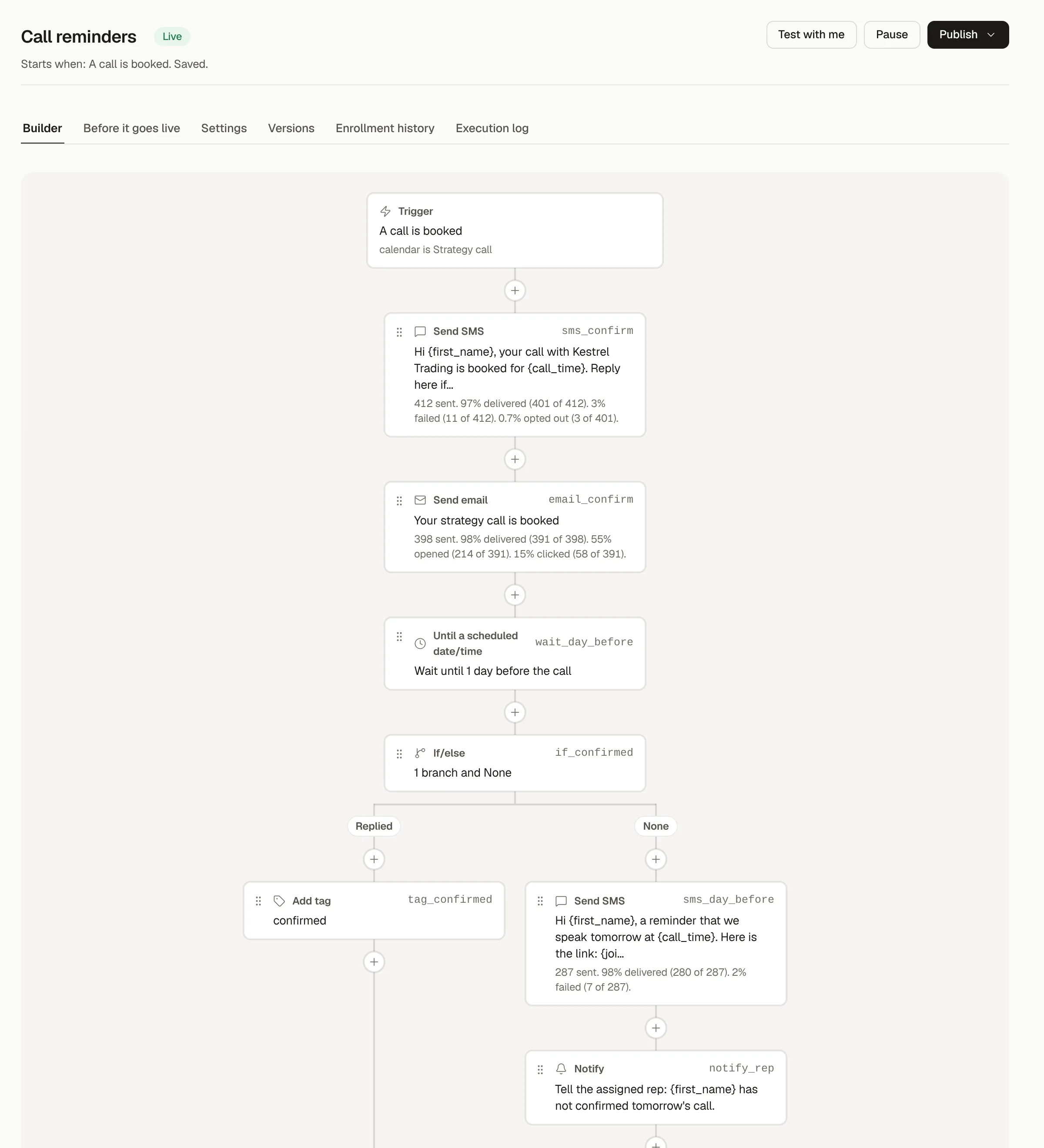
Follow-ups that send themselves. From your own number and your own domain.
Build each workflow on one canvas: a trigger such as a booked call or a missed webinar, then the texts, emails, waits, branches and goals that follow it. Every step shows what it sent and how it landed, and a new workflow runs in shadow, recording what it would have sent, until you put it live.
- Triggers from bookings, no-shows, payments, forms and webinars
- Waits, if/else branches, splits and goals
- Shadow first, then live, with every published version kept
Inbox and deliverability
Every reply in one inbox. Sending that looks after its own reputation.
Texts and emails from your workflows and your team sit in one thread per contact, and PYLO watches the carriers and inboxes so the next send still lands.
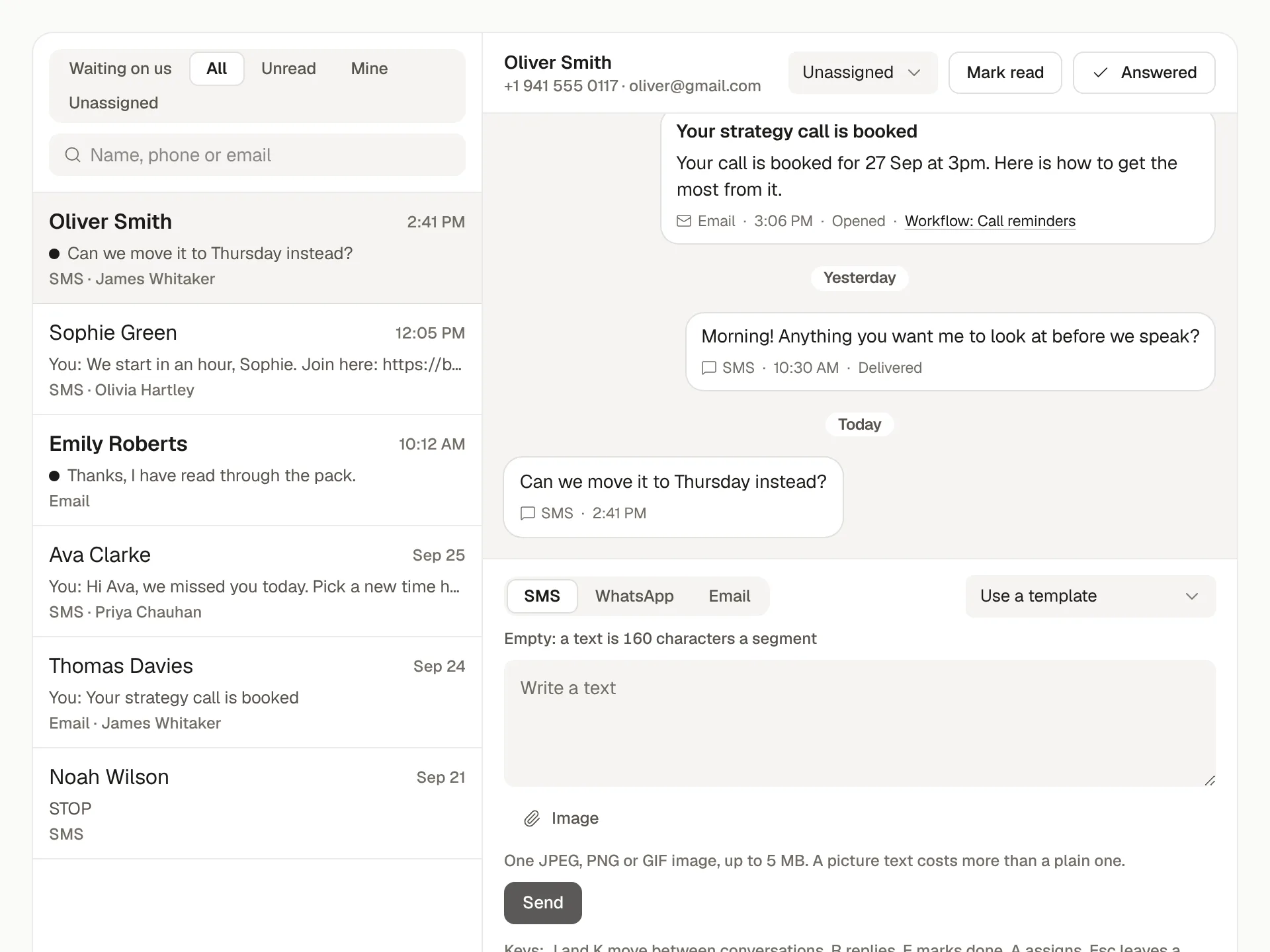
Conversations
Every contact's texts and emails in one thread, workflow messages included, with replies sent one to one by whoever owns the lead.
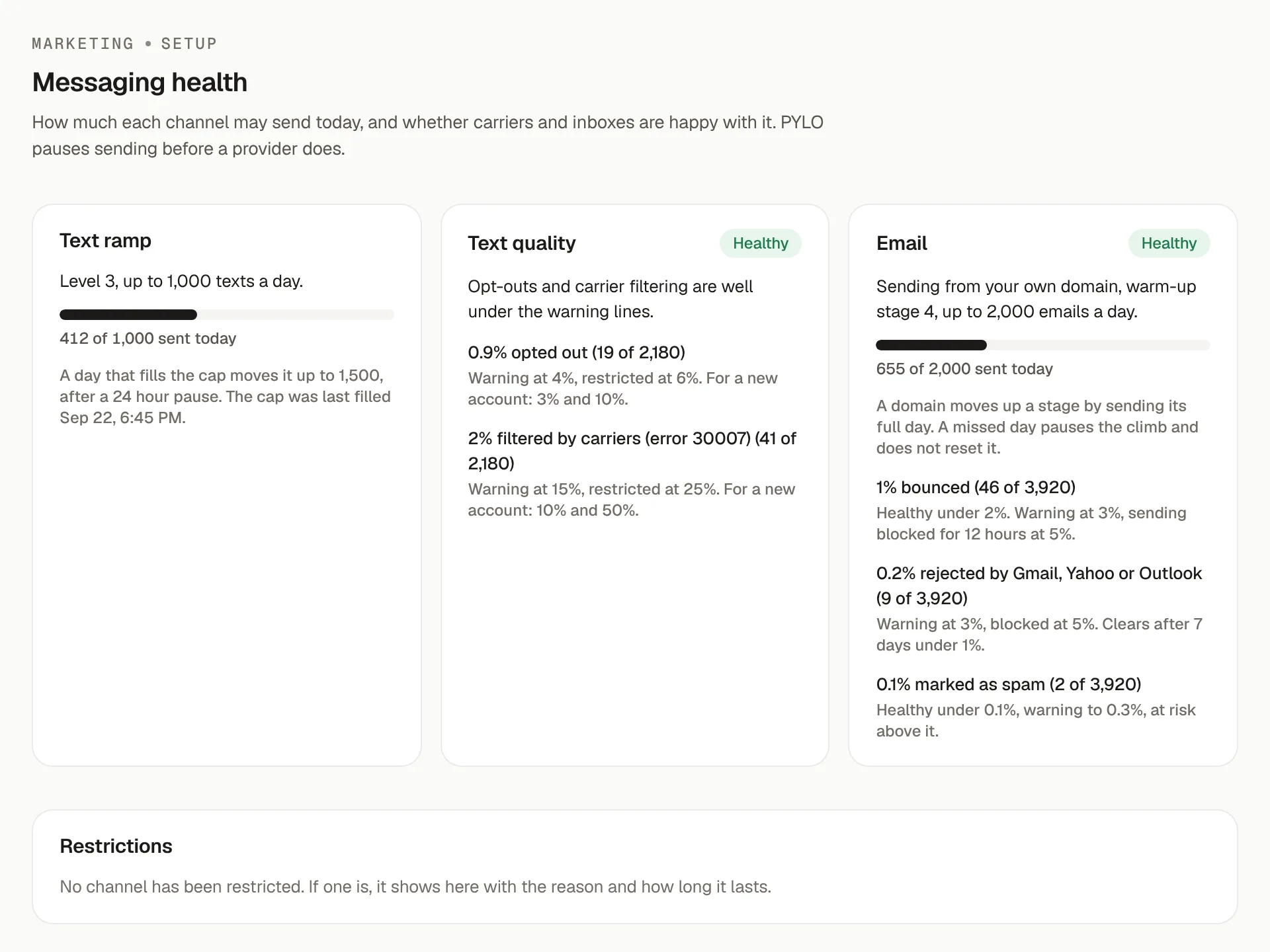
Deliverability
Sending limits that rise as your reputation does, automatic pauses on opt-outs and bounces, and STOP and unsubscribe handled for you.
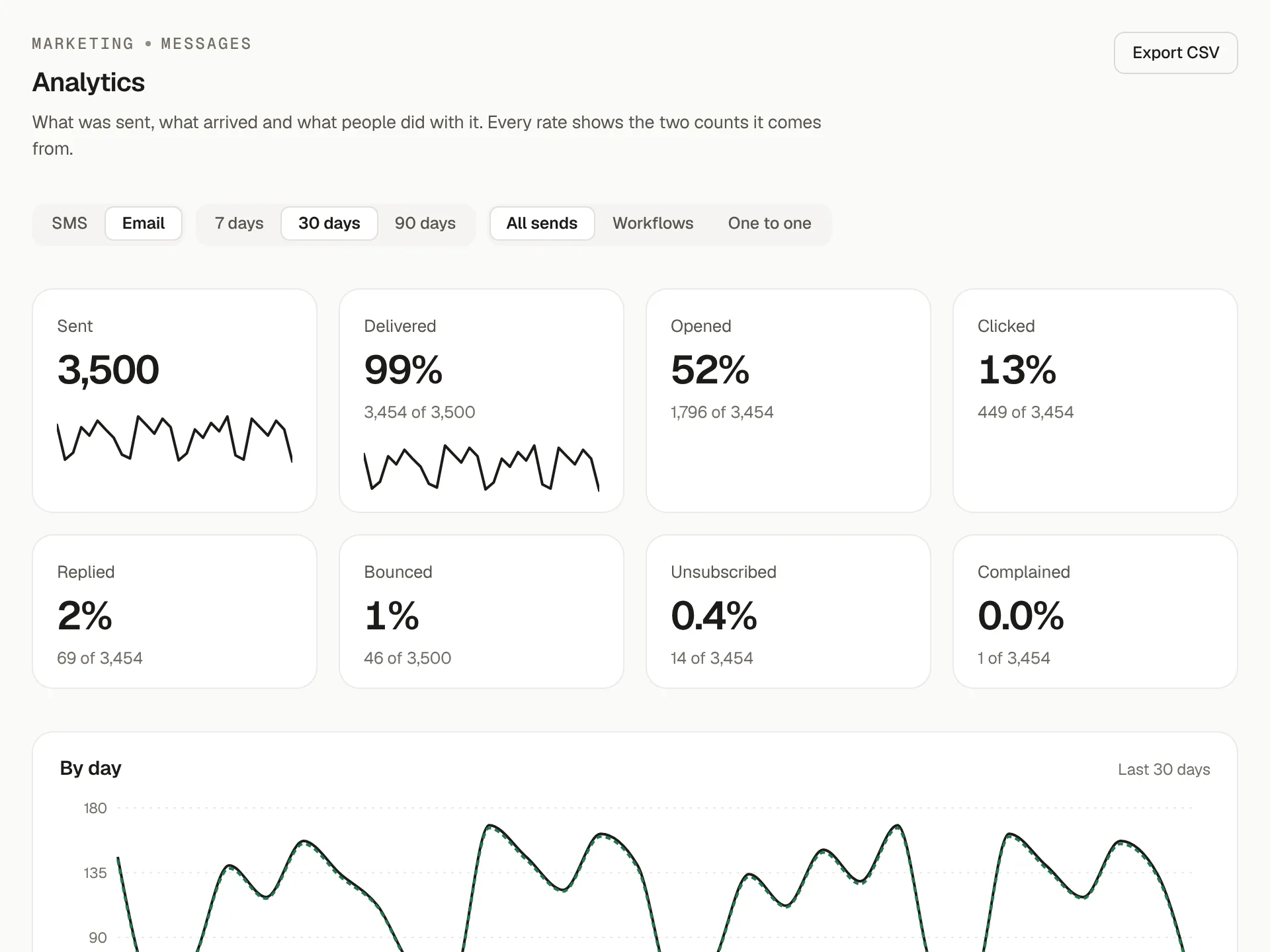
Analytics
Delivered, opened, clicked and replied for each channel and each workflow, every rate shown with the two counts behind it.
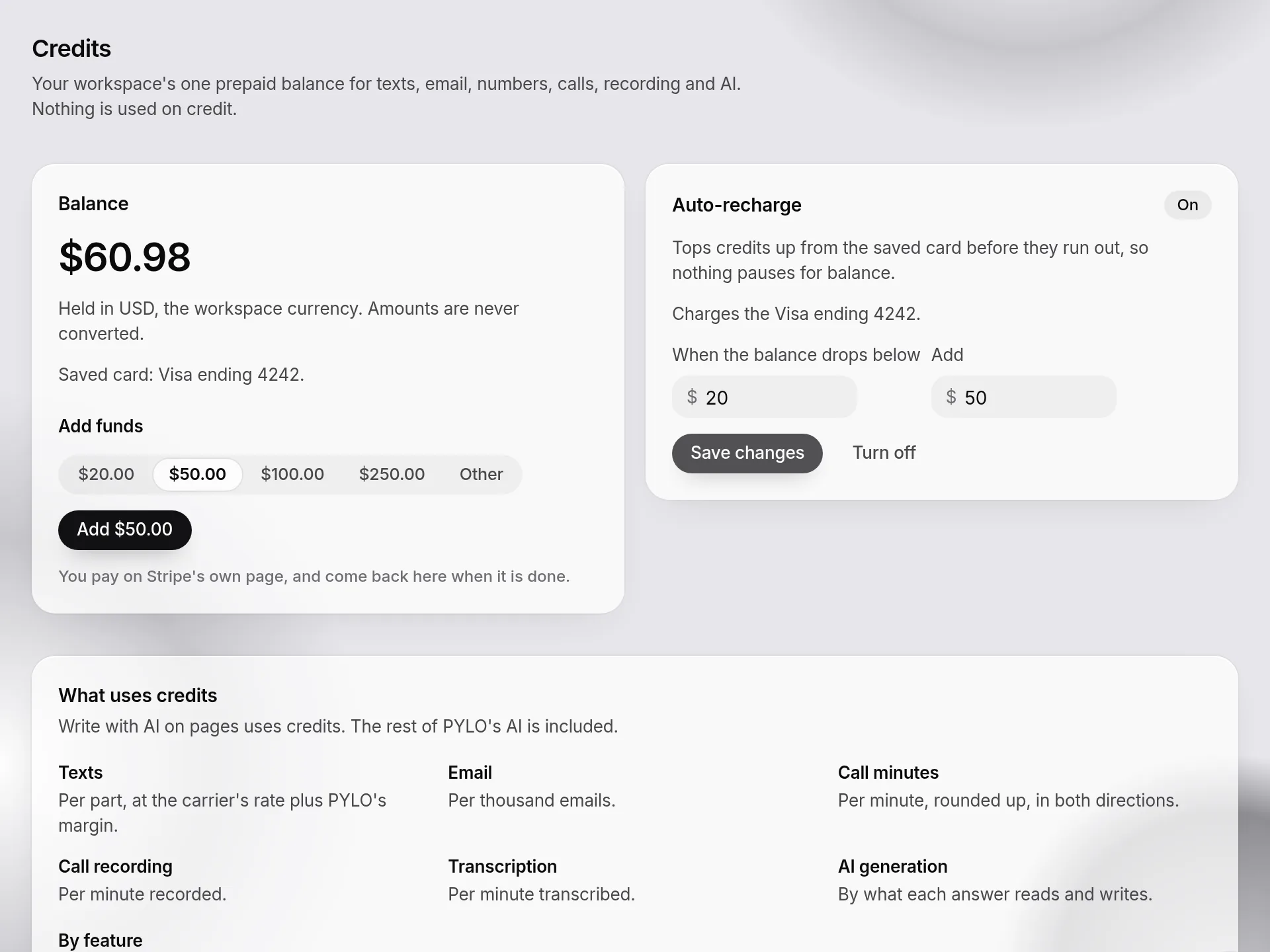
Credits
One prepaid balance for texts, emails, WhatsApp, AI, call minutes and recordings, with numbers bought inside PYLO and auto-recharge before it runs low. Or connect your own Twilio and email provider.
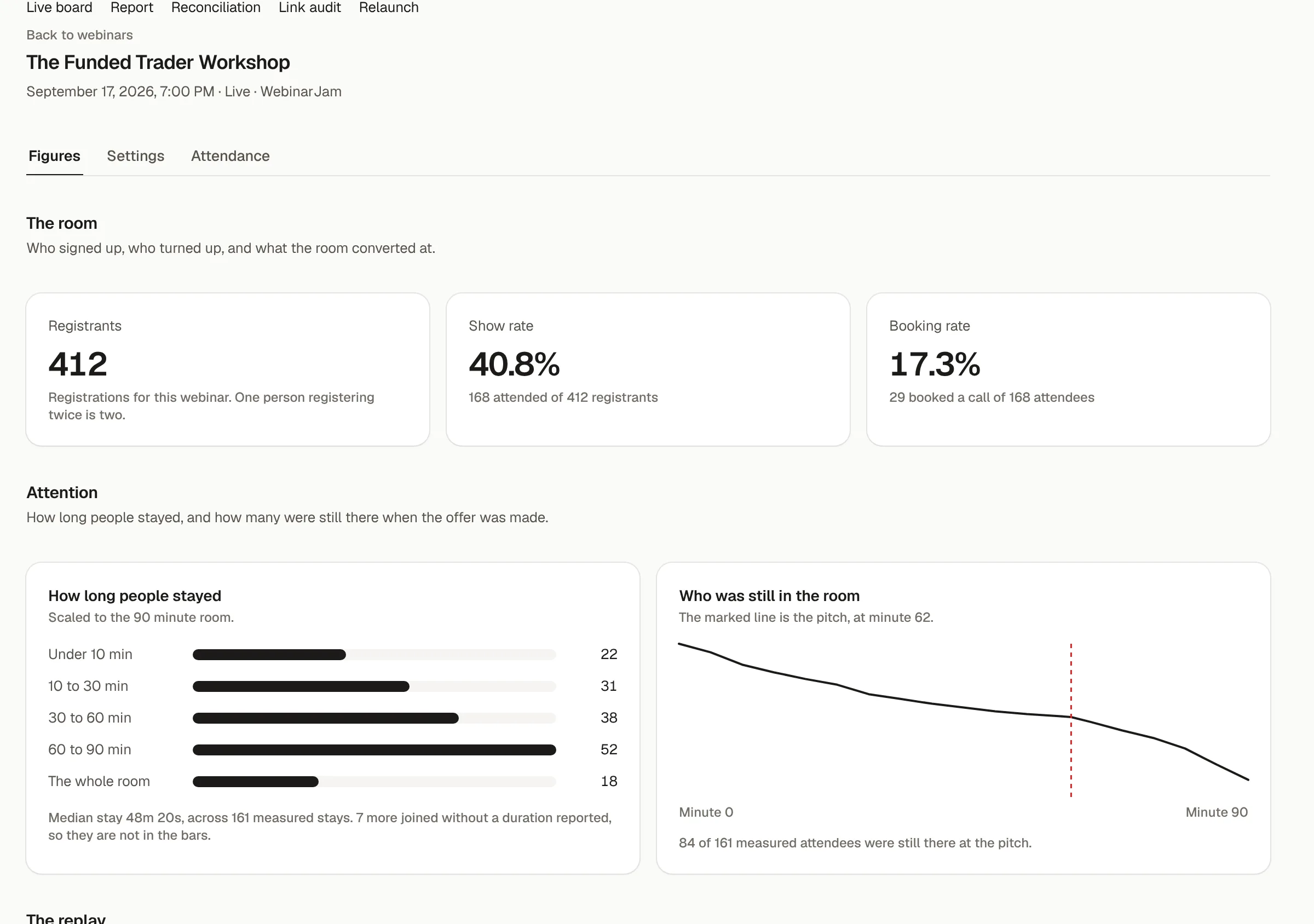
Webinars
Every webinar, scored the night it runs. Not in a spreadsheet next week.
Registrations, show rate, bookings and who was still there at the pitch, for every run. A live board while you're on air, and a relaunch in one step.
Why PYLO
A sales system multiplies whatever you feed it. Feed it gaps and it returns confident numbers that are wrong.
17 calls this month with no form.
Every missing post-call form is a close nobody counted. PYLO shows the gap the day it opens.
A rep drifts for three weeks.
EODs are filed from the rep's phone or flagged as missing, so drift shows up the same week.
A dashboard that's wrong doesn't look wrong.
Every figure opens into its rows, so a number gets checked in seconds.
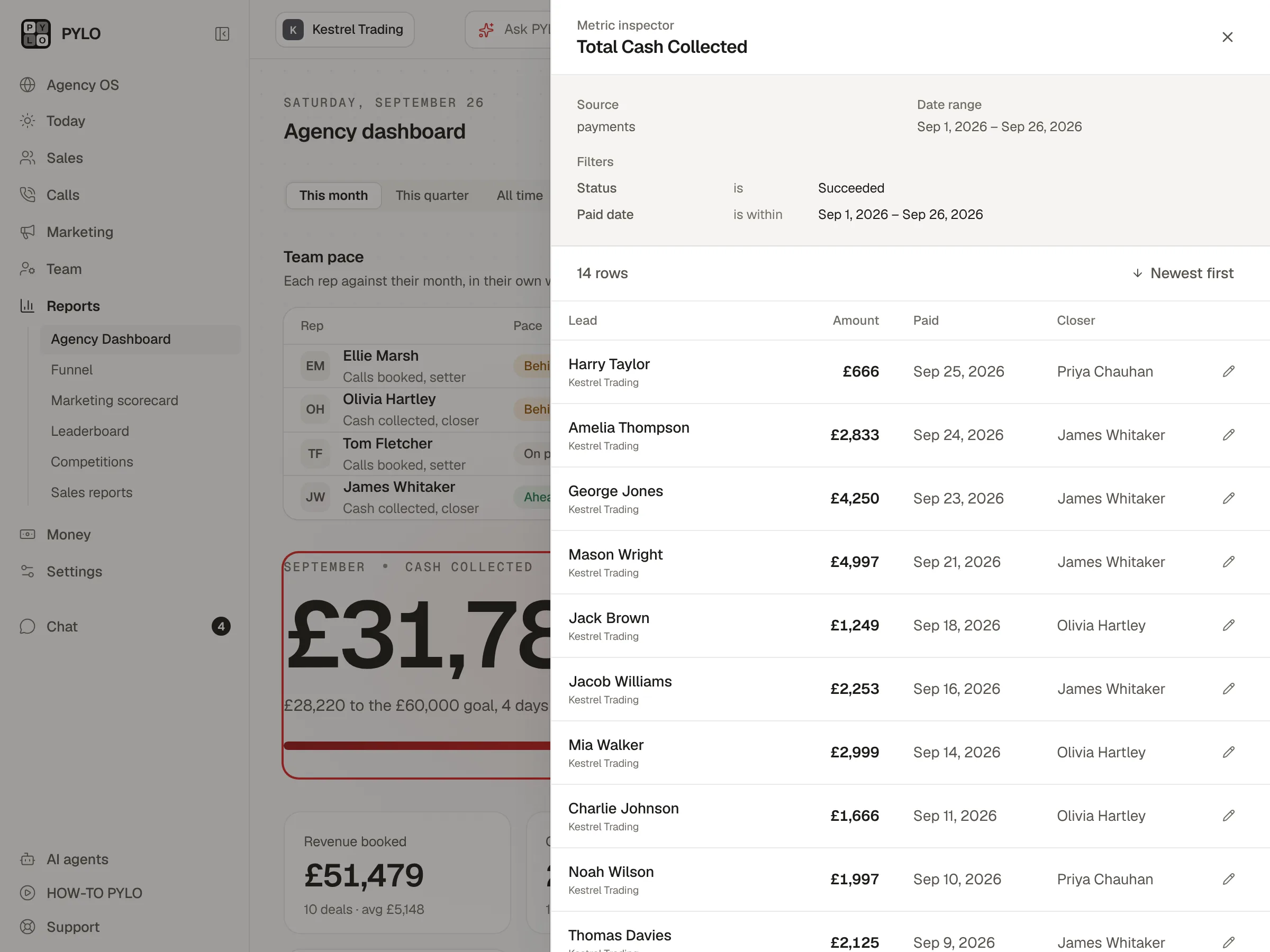
Metric inspector, on both plans
Click any number. See every row behind it.
Every figure opens into its source table, its conditions and the exact rows. Fix a row in place, and every edit goes to the audit trail.
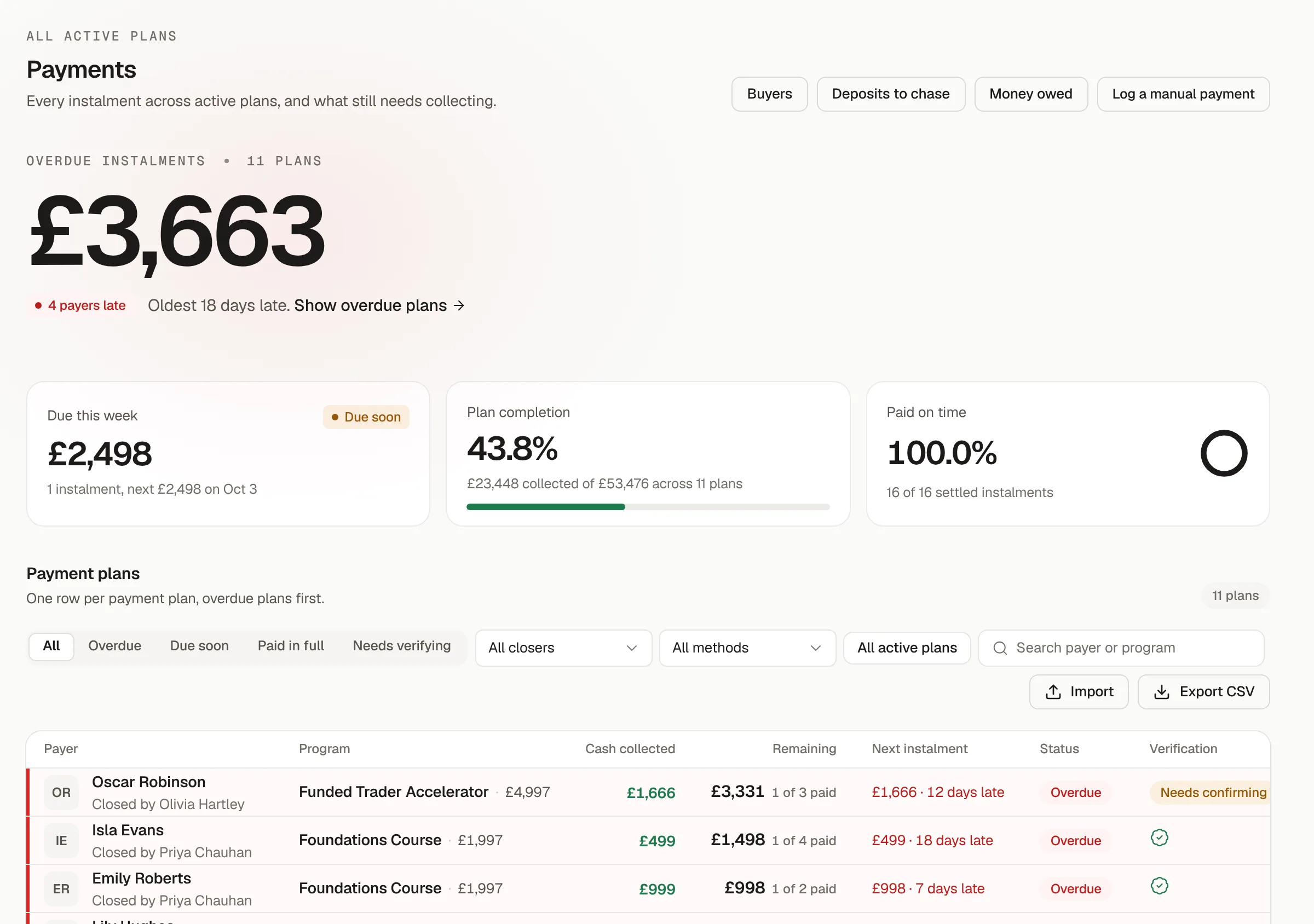
Payment plans
An instalment slips. Then it becomes a write-off.
Every plan, instalment and balance, overdue first. Reported payments stay unverified until the processor confirms them.
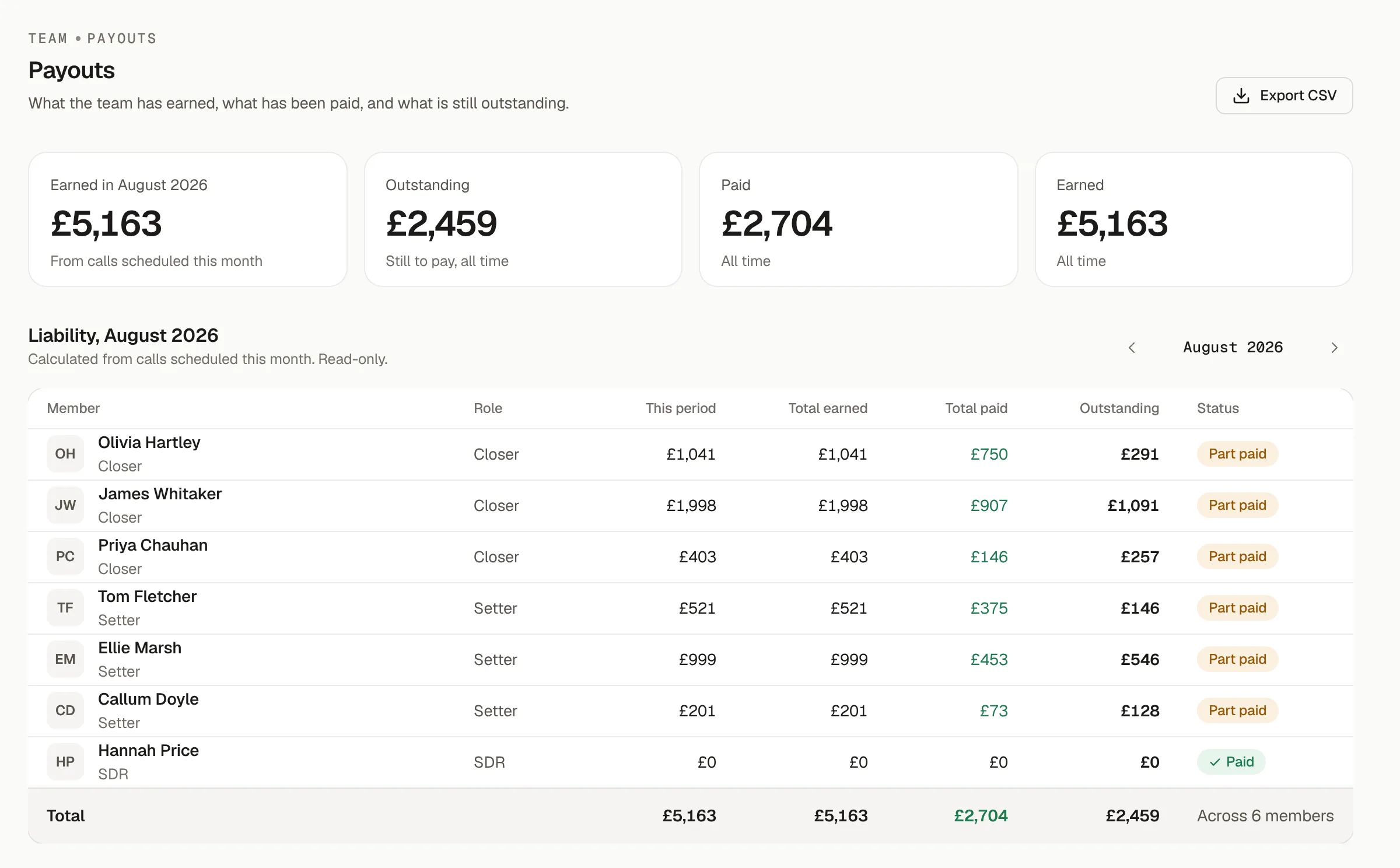
Commission and payouts
What every rep is owed. Calculated, not argued.
Set close, set and override rates once. PYLO works out what each rep earned, what has been paid and what is still owed.
Call analysis, on Pro
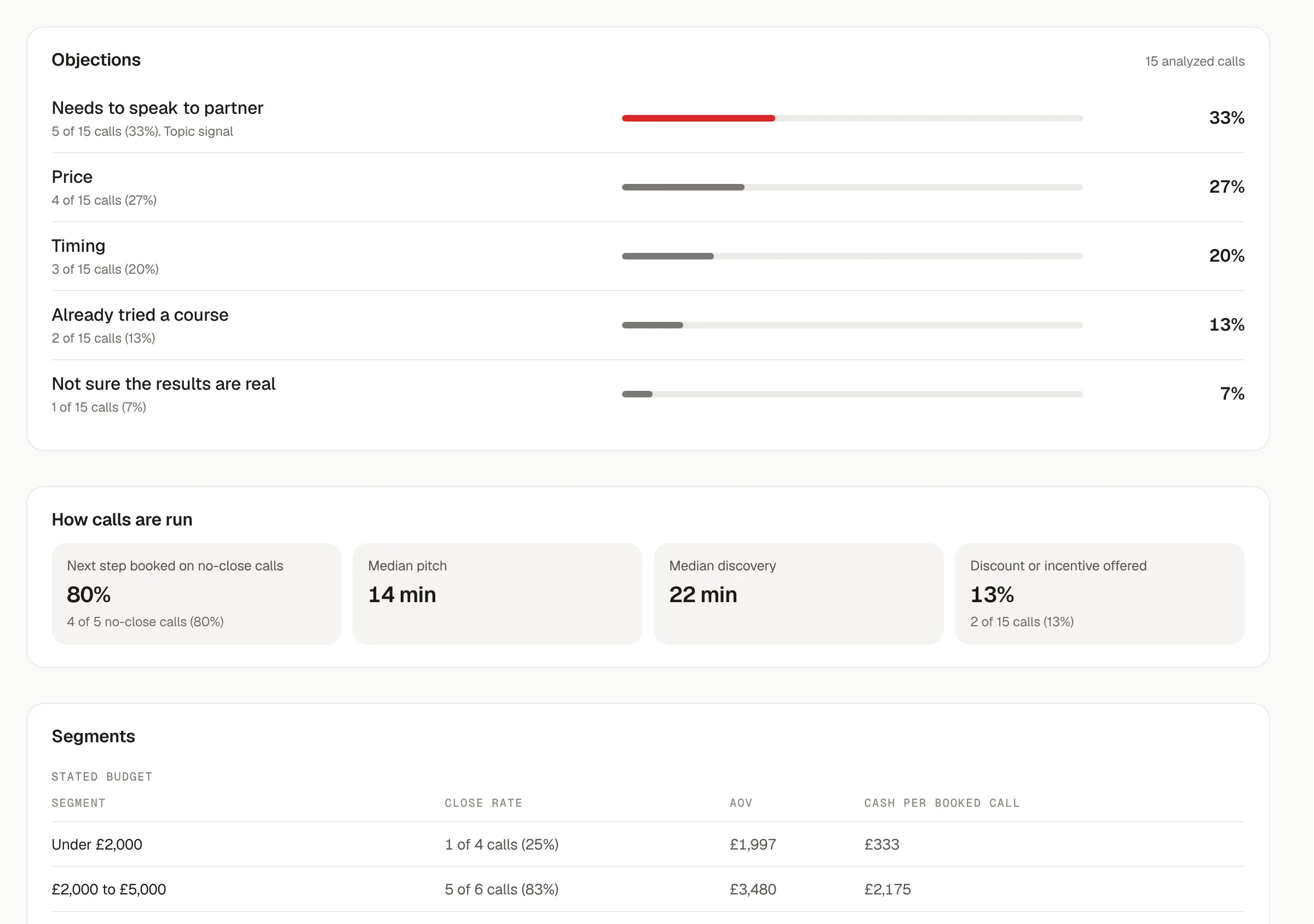
The objections your closers hear, counted across every call.
The objections prospects raise, the segments that buy, and whether the lead score held up once they were on the call.
Client onboarding, on Pro
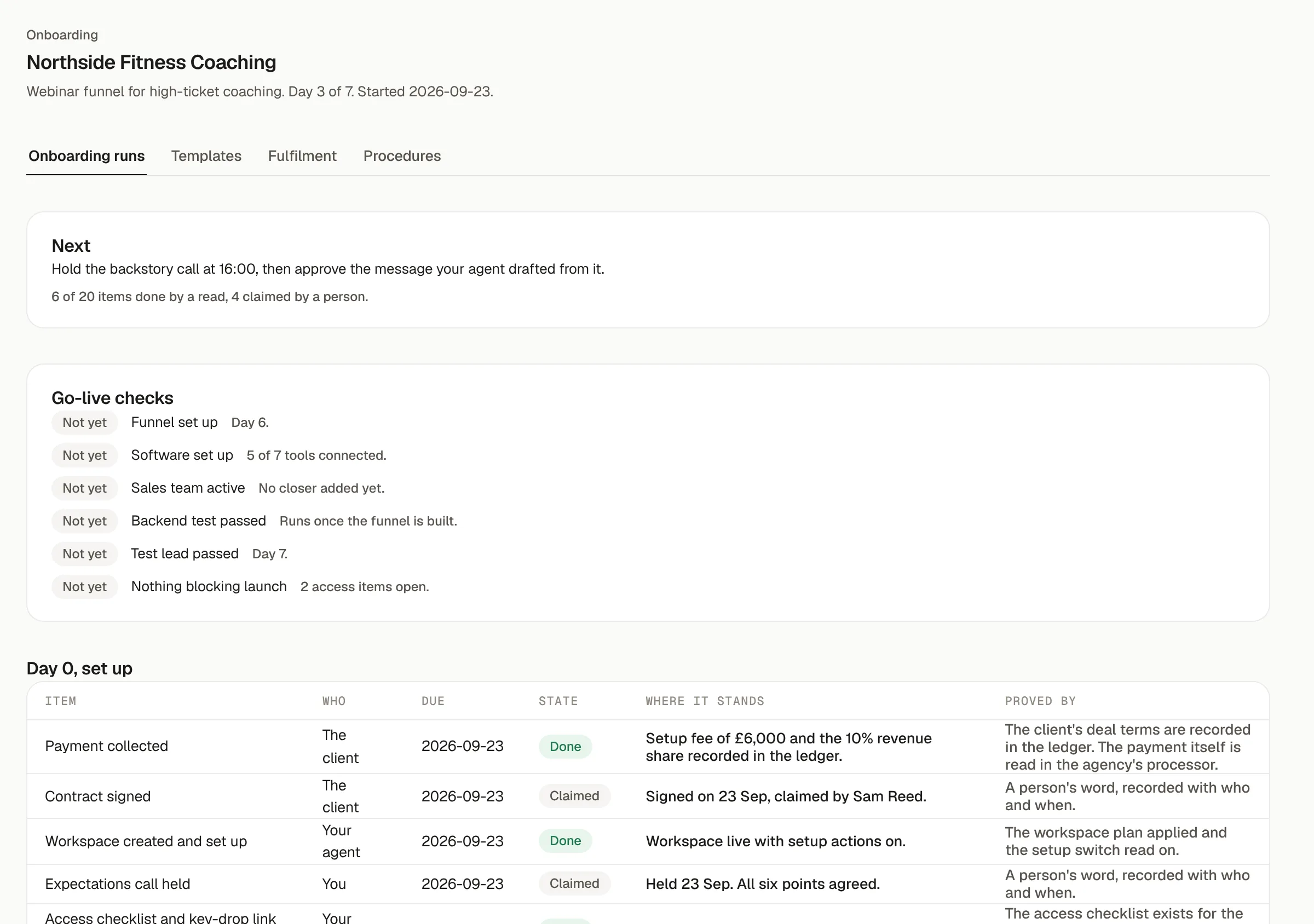
A new client, live in seven days. Every day planned.
A day-by-day plan for every client you sign, with one connect link for their whole stack and tracking proved on a test lead before launch.
Seven funnels
Whatever funnel you run, there is a starter for it.
Each starter sets up the pipeline, statuses and flows on Close or GoHighLevel, and counts every stage from opt-in to cash.
- VSL page
- Application
- Booked call
- Confirmed
- Live call
- Close
- Registration
- Reminders
- Attendance
- Booked call
- Close
- Content
- DM
- Setter
- Booked call
- Close
- Join
- Nurture
- Booked call
- Close
- Dial or cold email
- Conversation
- Booked call
- Close
- Registration
- Day 1
- Final day
- Booked call
- Close
- Opt-in
- Dial or DM
- Signup through your link
- Kept past the window
Your stack, connected once
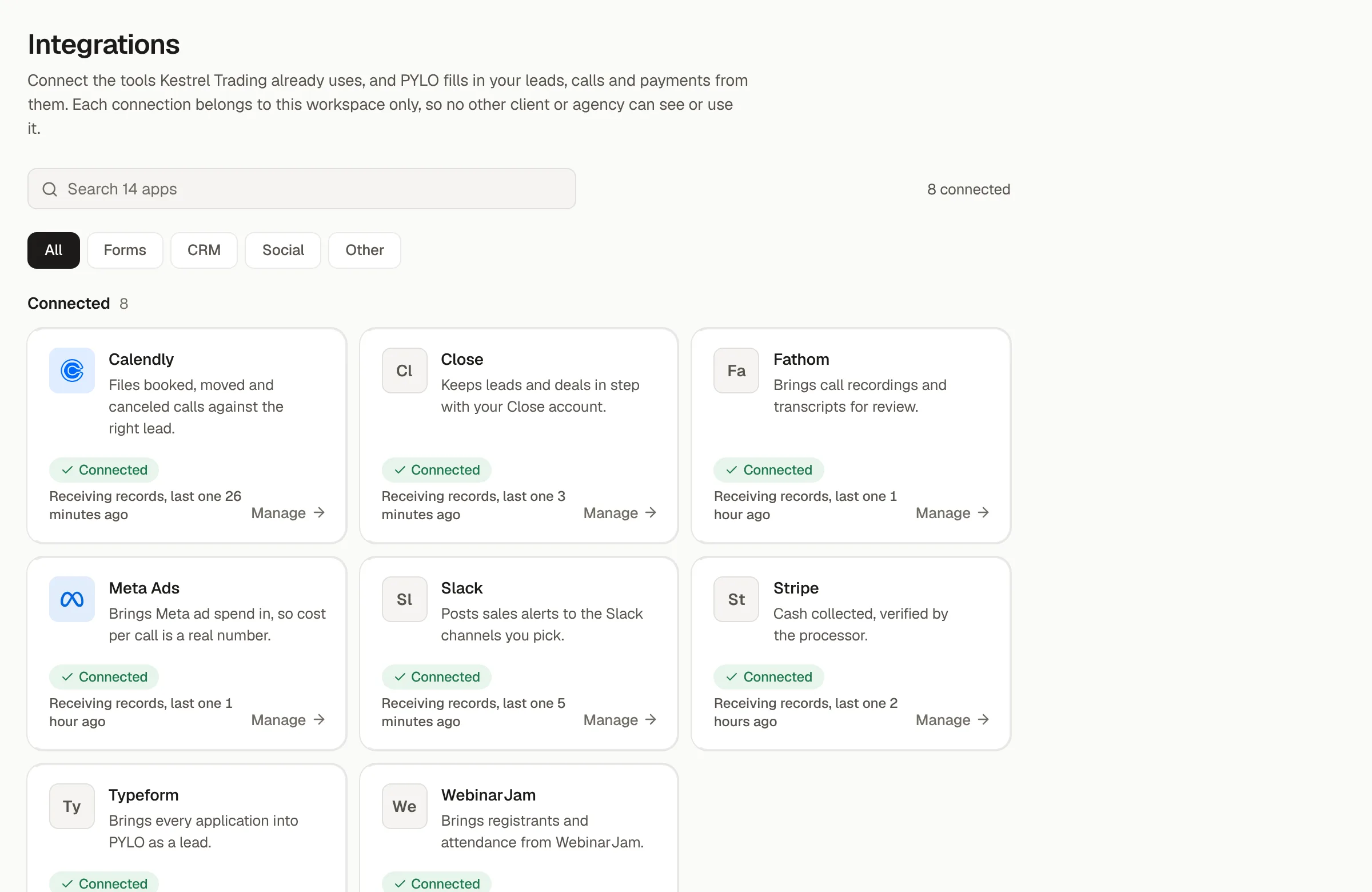
One link for the whole stack. Then proof it is working.
The client connects their whole stack from one link. Each tool then shows whether records are arriving, so a feed that stops is caught the same day.
Run it in shadow first
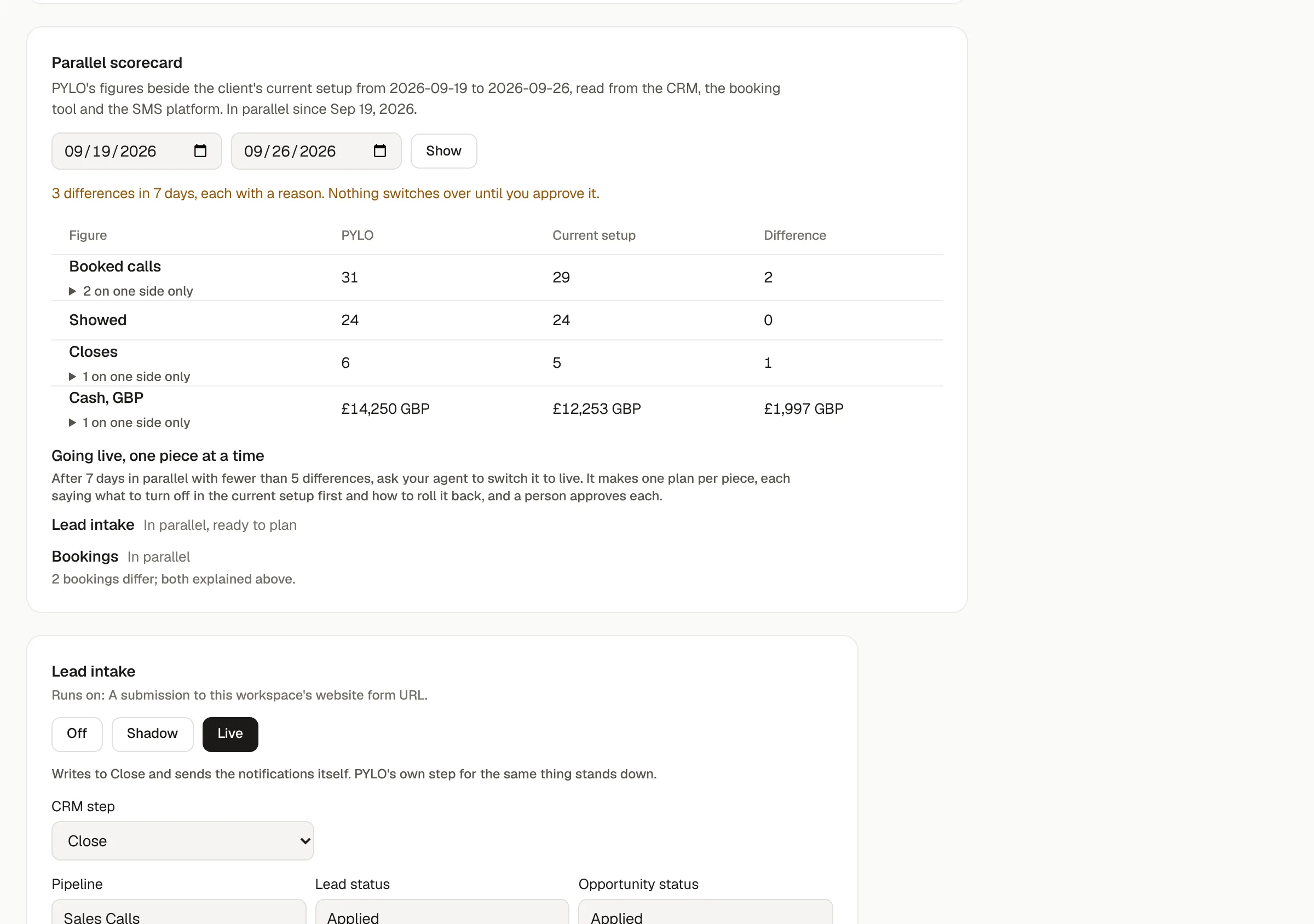
Run PYLO beside your current setup. Switch over when the numbers agree.
PYLO runs beside your current tracker and writes nothing to your tools. Both sets of figures sit side by side, and every difference gets a reason.
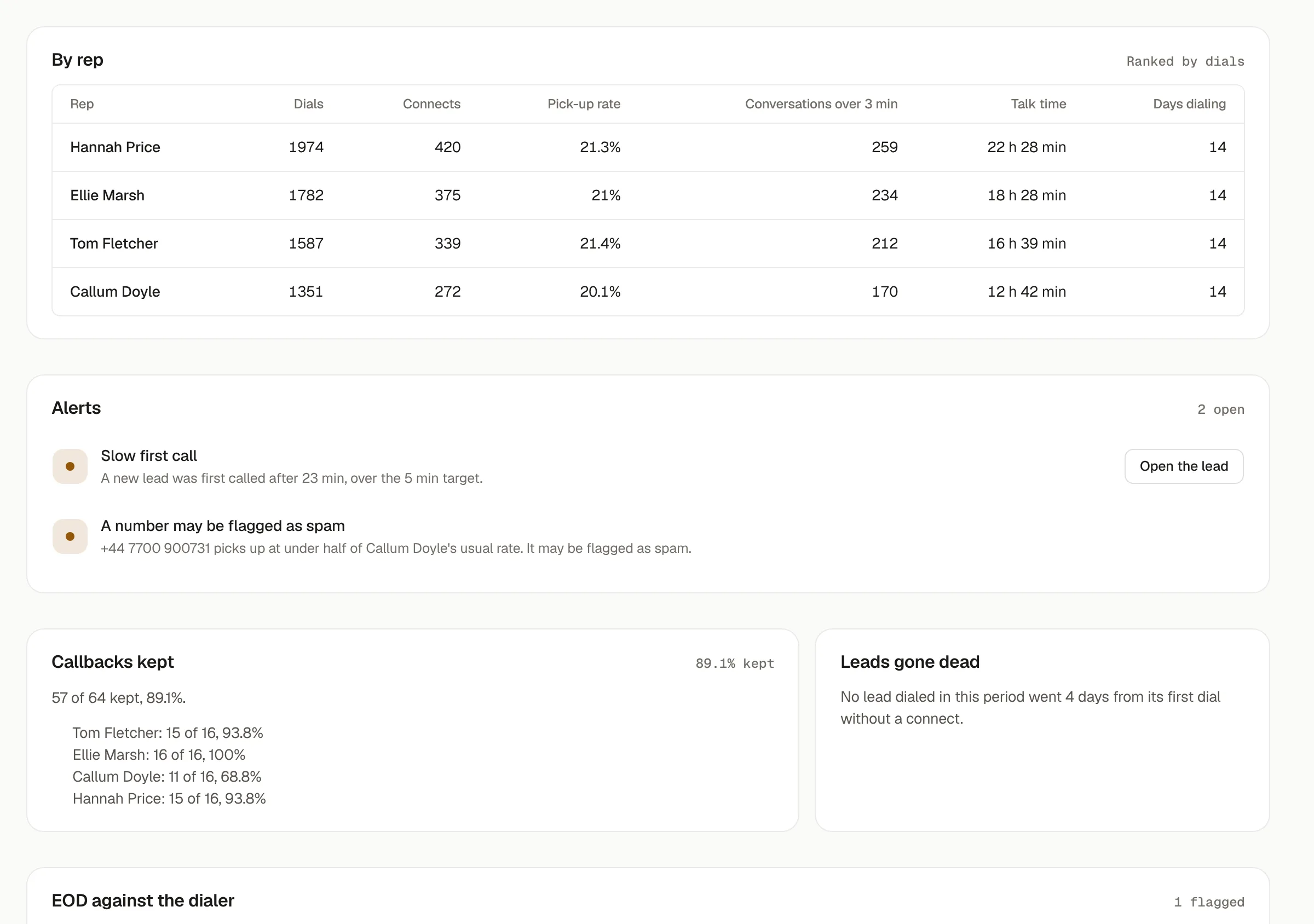
Speed to lead and rep activity
Who is on the phones, and whether it is landing.
Dials, connects and talk time for every rep, from PYLO's own dialer or read from Aircall, JustCall, Close or GoHighLevel. A slow first call or a burned number shows up the same day.
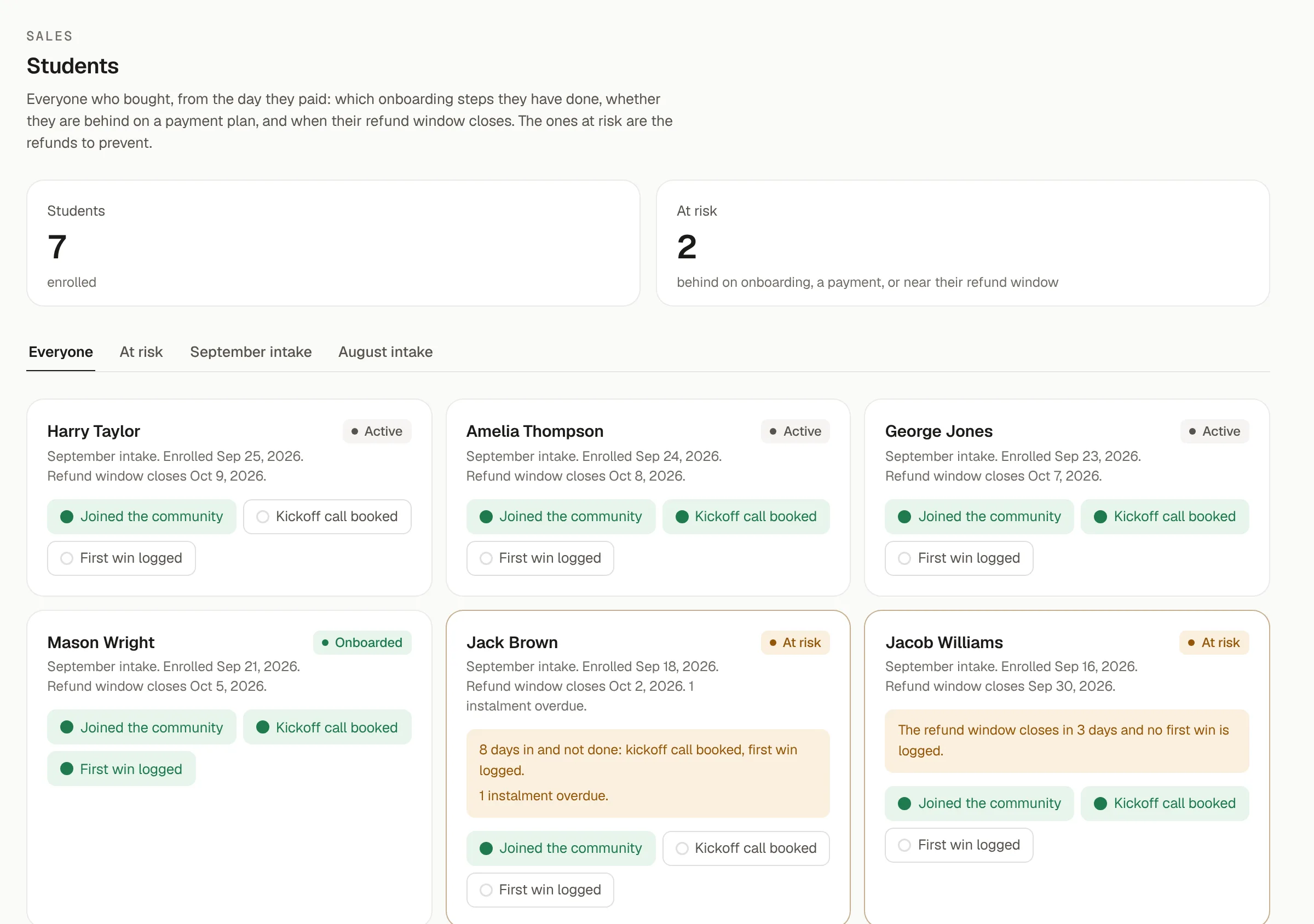
Students after the sale
A sale is not the finish line. Refunds start in the first two weeks.
Every buyer becomes a student the day they pay, with their onboarding steps and refund window. The ones at risk are refunds you can still prevent.
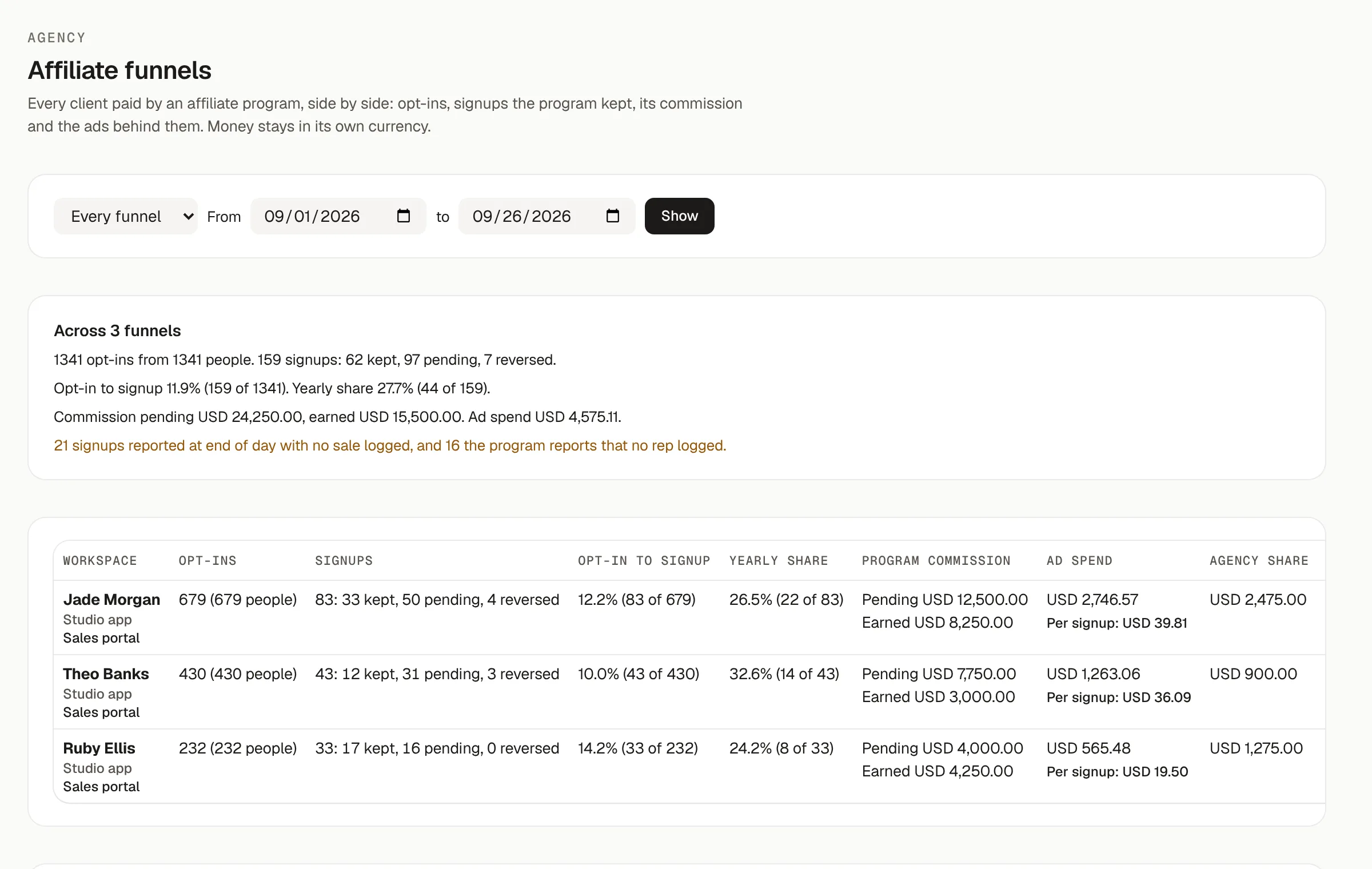
Affiliate funnels
Paid on the signups they keep. Counted per ad and per rep.
Each opt-in carries its ad and its rep, and the program's own report confirms who stayed past the window.
And the rest of it. Built, shipped and in use.
Pricing
Two plans. No setup fee, no lock-in.
7 days free, no card needed, and you can cancel any time.
For every sales team. 5 seats included.
- Post-call forms, DM closes and EODs
- Lead pipeline and the Today call board
- Live dashboard, every figure opens to its rows
- Commission ledger, payouts and payment plans
- Funnel view, UTM tracking and leaderboard
- Competitions and rep levels
For scaling teams and agencies. 10 seats per workspace, plus 3 Agency OS seats.
- Everything in Basic
- 10,000 new leads and 1,500 booked calls a month
- 15 booking pages, 15 forms and 15 landing pages
- Agency OS, including two client workspaces
- Call analysis: objections from real calls
- Onboard clients from Claude, on your approval
“I didn't build PYLO in a boardroom. I built it inside a working agency, for a real sales team, fixing real problems the week they happened. Every feature exists because someone on that team needed it.”
Chimax, founder of PYLO and operator at Info Elevate
Questions, answered.
How long does setup take?
About a day. We set up your workspace, connect your CRM and calendar, and your team is working in it the next morning.
Does it work with my CRM?
Close and GoHighLevel connect on both plans, and HubSpot and Pipedrive connect through the connector library. Your CRM keeps the contacts; PYLO runs the operation on top of it.
Which tools does it connect to?
Close, GoHighLevel, Calendly, Typeform, Slack, Stripe, PayPal, Whop, Airtable, Discord, Fathom and Zoom, plus connectors for HubSpot, Pipedrive, WebinarJam, Aircall, Kajabi, Klaviyo and more. Each one is listed in the app with what it brings in.
Do I still need Calendly, Typeform or a dialer?
No, though you can keep them. PYLO has its own booking pages, forms, landing pages, dialer and call recorder, and anything usage-based draws from one credits balance. If you keep Calendly, Typeform, Aircall or JustCall, PYLO reads from them as it always has.
What can I do from Claude or ChatGPT?
Connect Claude, ChatGPT or any MCP client to your workspace and ask it anything about your numbers. It reads the same figures you see, with what each one means. On Pro it can also make changes, each one a plan you approve with a code on your phone, and onboard a new client from deal terms to a tracked test lead.
What can the AI assistant see?
Your workspace, and only your workspace. It reads your live data to answer questions and cannot reach another client's numbers.
How do I know the numbers are right?
Open one. Every figure on your dashboard breaks down into the rows and conditions behind it, so a number that looks off gets checked in a few seconds.
Who can see commission figures?
You decide, per workspace. Reps either see their own figures or the whole team's.
Can I cancel any time?
Yes. Monthly billing, no lock-in, and you can export your data whenever you like.
Start with the numbers you already have.
Set up in a day. Your team working in it by tomorrow.